Personal project / Done
Tou
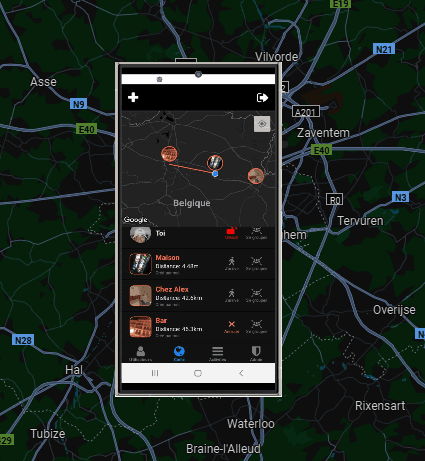
Private mobile application to easily find my friend when we go out
A closer look
01User's localisation tracking
Real-time location sharing is the core feature of this application.
Once user is connected, he must grant access to his location. Then, he sends his location every 5 meters to all users.
His location is updated on everyone's map and, distance between user and him is also recalculated.
This feature works in the background, ensuring continuous tracking while minimizing battery usage.

02Add a marker
Creating meeting points helps coordinate gatherings in specific locations.
The user can create a marker at their location by clicking on the cross in the top-left corner or by long-pressing at a specific location on the map. A modal appears allowing them to give a name, a color, and a photo to the marker.
Users with the app open will receive a toast notification informing them of the creation of a new marker, facilitating real-time coordination.


03Delete a marker
Managing meeting points includes the ability to remove outdated or incorrect markers.
The creator of a marker and the admin (myself) can delete the marker. This helps keep the map clean and relevant.
When a marker is deleted, other users are notified to prevent confusion.

04Tell all users I'm heading to a marker
Coordinating movements is essential for efficient meetups.
The user can click the 'I'm arriving' button on a marker. This sends a notification to the phones of people also heading to that marker, while displaying a toast to other users if they have the app open at that moment.
It draws a color line of the destination color between user and his destination on the map. Impossible to do if there's less than 10m between users and his destination.

05Tell a user I'm joining him
Person-to-person coordination allows users to connect directly.
The user can click the 'On my way' button on a user. This sends a notification to this user's phone, while displaying a toast to other users if they have the app open at that moment.
This feature facilitates direct meetups between individuals. Impossible to do if there's less than 10m between both users.


06Tell all users I want a gathering on a marker
Organizing group gatherings at specific locations improves coordination.
The user can click the 'Regroup' button on a marker. This sends a notification to all users' phones. The button has a 30-second cooldown before it can be used again. The user is flagged as "on his way to this marker".
The notification includes two buttons:
- 'I'm arriving': Notifies the sender that the person is on their way
- 'Ignore': Does nothing
If the user taps on the notification itself instead of a button, it opens the app and centers the map on the marker.


07Tell all users I want a gathering on me
Becoming a meeting point allows a user to gather others at their location.
The user can click his 'Regroup' button. This sends a notification to all users' phones. The button has a 30-second cooldown before it can be used again.
The notification includes two interactive options:
- 'I'm arriving': Notifies the sender that the person is on their way
- 'Ignore': Does nothing
If the user taps on the notification itself instead of a button, it opens the app and centers the map on the sender's position.


08Tell users I've arrived to my destination
Arrival notifications complete the movement tracking cycle.
When a user announces he's heading toward a marker or a person and arrives at his destination, the app detectes it and notifies, via a notification, the people going to the same place — or the person who requested the regroup.
This feature helps everyone keep track of who has already arrived at the meeting point.
09[Admin] Disable a user account
Administrative control ensures security and proper usage of the application.
An admin panel is accessible only from my account. It allows me to authorize or deactivate a user account from using the app.
When an account is deactivated:
- A screen appears informing the user
- They can no longer see or do anything within the app
- Their location is no longer shared with others
![Tou — [Admin] Disable a user account](/images/tou-feats/feat9.jpg)
10[Admin] Create a user account
Controlled user access maintains the private nature of this application.
An admin panel is accessible only from my account, and it's the only way to create a new user account. This ensures that unauthorized users cannot access the app.
This process includes:
- Creating login credentials
- Adding the user to the system database
![Tou — [Admin] Create a user account](/images/tou-feats/feat10.jpg)
11History
Event tracking provides users with context of past activities.
A history of all events up to 48 hours ago is available. This includes:
- Marker creations and deletions
- User movements and announcements
- Gathering requests and responses
- User connections and disconnections
This feature helps users understand what happened when they weren't using the app.

12Authentification
User has to auth with credentials i gave him.
There is no possibility tu sign up since i don't want random people to use this app unless i authorized them

13List of current users
A simple list of users currently authorized on the app
